

First: Don't worry as much about the image dimensions, but rather the file size. Using your favorite photo editor, save your image file to something below 500KB in size and you'll be good to go for uploading.
Then go to the forum you want to post in. Create a new post or reply to an existing topic thread. Then follow the pictures and instructions below:
NOTE: Click on the pictures to ENLARGE them.
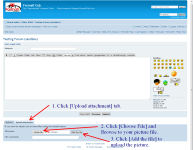
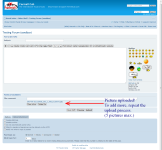
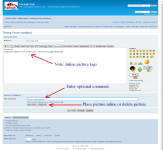
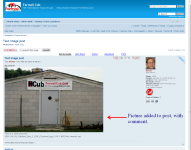
Then go to the forum you want to post in. Create a new post or reply to an existing topic thread. Then follow the pictures and instructions below:
NOTE: Click on the pictures to ENLARGE them.