
You are using an out of date browser. It may not display this or other websites correctly.
You should upgrade or use an alternative browser.
You should upgrade or use an alternative browser.
Dial up, pics??
- Thread starter Baitshop
- Start date
Jared:
Posting pics can present real problems for dialup users especially if they are large.
WinXP Image tools or Irfanview can resize the images down to a 30-60 kb file without losing definition or clarity. Just make sure that you choose 640x480 for image size.
By uploading large pics and then posting links, you are not minimizing the load for dialup, just moving it to a different venue. By resizing you allow the pics to be inside the thread making it much easier and quicker for dialup users to view the pics.
Jared,
You should reduce the pictures like Rudi outlined. But even when you do it, you shouldn't include more than one or two pictures in the message. If you have more, just include links. The poor soul on dial-up has no way of knowing your post has a bunch of pictures before he clicks on it. He just clicks and his computer goes away for a half hour.
If you use links, he can see the text of the post in a reasonable time then can choose to click on individual pictures as he wants. Your link can be to a page of thumbnails (that download fairly quickly), making it easy for anyone to decide which pictures to pull down in a larger size. Doing it this way, the dial-up user will only be saddled with the entire wait of in-line pictures if he chooses to click on each and every picture.

I've also seen on other forums users put "PICS" or something similar in the thread title so dialup users are forewarned it may take a while to load. Since this forum software is so that individual threads are created by users it's easy to just read the threads you want. Unlike Discus forum software that the other Cub Cadet forums use. vBullitin forum software has the option to read without pics and is just a plain black and white page, but has a link to the full page with images if you want to view that way. It's sortof like a WAP formatted web page. I don't think phpBB software has these options.
by Rudi
WinXP Image tools or Irfanview can resize the images down to a 30-60 kb file without losing definition or clarity. Just make sure that you choose 640x480 for image size.
I used WinXP Image tools to resize this picture to 50kb and the size is 640x480:
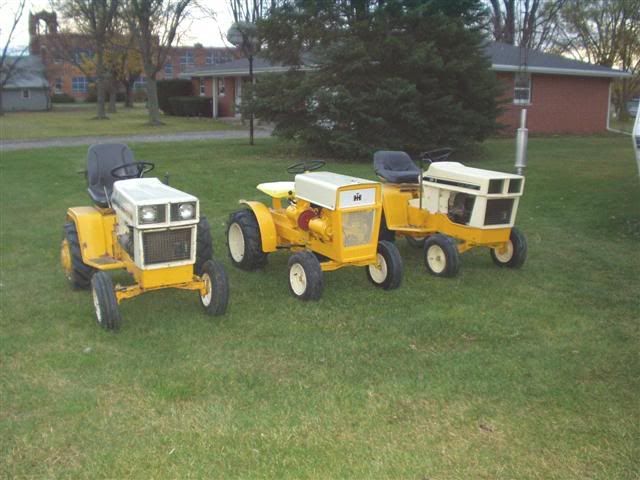
Does this work for dial uppers?
by Rudi
Works for me.. nice CC's
Thanks Rudi!!
(Left to Right)
149-100-86
All 3 are set up to plow. The paint on the 100 is around 2 months old.
Hey Guys, from now on I will put a disclaimer in the title to my posts if they contain pics. I really enjoy pics of what other people are doing, that's why I post pics. I am a mac guy, and I have no idea how to reduce the size of my pics. I will bump around on my photobucket account to see if there is a way to reduce them before I link them.
Thanks for all the input,
Jared
Thanks for all the input,
Jared
HEY Jared!!---If your using photobucket, you have half the battle won!!! just use the thumbnail method that I use on there!!
Look about half way down the page and choose the option that says thumbnails for message boards!---should work with the mac too!
If you want to do this and need help getting started, let me know! thanks; sonny
Look about half way down the page and choose the option that says thumbnails for message boards!---should work with the mac too!
If you want to do this and need help getting started, let me know! thanks; sonny